> For the complete documentation index, see [llms.txt](https://sec88.0x88.online/llms.txt). Markdown versions of documentation pages are available by appending `.md` to page URLs; this page is available as [Markdown](https://sec88.0x88.online/programming/java/java-essentials.md).

# Java Essentials

## Java JDK, JRE and JVM

* **JVM (Java Virtual Machine)** is an abstract machine that enables your computer to run a Java program.

<figure><img src="/files/CaXp9kK5XupRSjadQxjS" alt=""><figcaption></figcaption></figure>

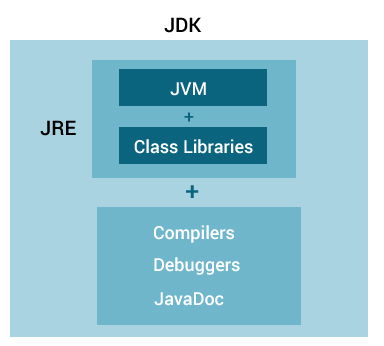
* **JRE (Java Runtime Environment)** is a software package that provides Java class libraries, Java Virtual Machine (JVM), and other components that are required to run Java applications.
* **JDK (Java Development Kit)** is a software development kit required to develop applications in Java. When you download JDK, JRE is also downloaded with it.

### What is JDK? <a href="#jdk" id="jdk"></a>

JDK (Java Development Kit) is a software development kit required to develop applications in Java. When you download JDK, JRE is also downloaded with it.

In addition to JRE, JDK also contains a number of development tools (compilers, JavaDoc, Java Debugger, etc).

<figure><img src="https://cdn.programiz.com/sites/tutorial2program/files/java-development-kit.jpg" alt="JDK contains JRE and other tools to develop Java applications." height="101" width="370"><figcaption><p>Java Development Kit</p></figcaption></figure>

If you want to develop Java applications, [download JDK](http://www.oracle.com/technetwork/java/javase/downloads/index-jsp-138363.html).

***

### Relationship between JVM, JRE, and JDK.

<figure><img src="https://cdn.programiz.com/sites/tutorial2program/files/jdk-jre-jvm.jpg" alt="JRE contains JVM and class libraries and JDK contains JRE, compilers, debuggers, and JavaDoc" height="346" width="384"><figcaption><p>Relationship between JVM, JRE, and JDK</p></figcaption></figure>

## Java Operators

Operators in Java can be classified into 5 types:

1. Arithmetic Operators
2. Assignment Operators
3. Relational Operators
4. Logical Operators
5. Unary Operators
6. Bitwise Operators

### Arithmetic Operator

| Operator | Operation                                   |
| -------- | ------------------------------------------- |
| `+`      | Addition                                    |
| `-`      | Subtraction                                 |
| `*`      | Multiplication                              |
| `/`      | Division                                    |
| `%`      | Modulo Operation (Remainder after division) |

### Logical Operators

| Operator | Description          |
| -------- | -------------------- |
| `~`      | Bitwise Complement   |
| `<<`     | Left Shift           |
| `>>`     | Right Shift          |
| `>>>`    | Unsigned Right Shift |
| `&`      | Bitwise AND          |
| `^`      | Bitwise exclusive OR |

### Java Unary Operators

| Operator | Meaning                                                                          |
| -------- | -------------------------------------------------------------------------------- |
| `+`      | **Unary plus**: not necessary to use since numbers are positive without using it |
| `-`      | **Unary minus**: inverts the sign of an expression                               |
| `++`     | **Increment operator**: increments value by 1                                    |
| `--`     | **Decrement operator**: decrements value by 1                                    |
| `!`      | **Logical complement operator**: inverts the value of a boolean                  |

### Java Assignment Operators

| Operator | Example   | Equivalent to |
| -------- | --------- | ------------- |
| `=`      | `a = b;`  | `a = b;`      |
| `+=`     | `a += b;` | `a = a + b;`  |
| `-=`     | `a -= b;` | `a = a - b;`  |
| `*=`     | `a *= b;` | `a = a * b;`  |
| `/=`     | `a /= b;` | `a = a / b;`  |
| `%=`     | `a %= b;` | `a = a % b;`  |

### Java Relational Operators

| Operator | Example   | Equivalent to |
| -------- | --------- | ------------- |
| `=`      | `a = b;`  | `a = b;`      |
| `+=`     | `a += b;` | `a = a + b;`  |
| `-=`     | `a -= b;` | `a = a - b;`  |
| `*=`     | `a *= b;` | `a = a * b;`  |
| `/=`     | `a /= b;` | `a = a / b;`  |
| `%=`     | `a %= b;` | `a = a % b;`  |

### Java Logical Operators

| Operator            | Example                          | Meaning                                                    |
| ------------------- | -------------------------------- | ---------------------------------------------------------- |
| `&&` (Logical AND)  | expression1 **&&** expression2   | `true` only if both expression1 and expression2 are `true` |
| `\|\|` (Logical OR) | expression1 **\|\|** expression2 | `true` if either expression1 or expression2 is `true`      |
| `!` (Logical NOT)   | **!**&#x65;xpression             | `true` if expression is `false` and vice versa             |

### Java Bitwise Operators

| Operator | Description          |
| -------- | -------------------- |
| `~`      | Bitwise Complement   |
| `<<`     | Left Shift           |
| `>>`     | Right Shift          |
| `>>>`    | Unsigned Right Shift |
| `&`      | Bitwise AND          |
| `^`      | Bitwise exclusive OR |

## Java Basic Input and Output

### Java Output <a href="#output" id="output"></a>

```java
System.out.println(); or
System.out.print(); or
System.out.printf();
```

### Java Input <a href="#input" id="input"></a>

```java
import java.util.Scanner;
// create an object of Scanner
Scanner input = new Scanner(System.in);
// take input from the user
int number = input.nextInt();
```

## Java Flow Control

## Java if...else Statement

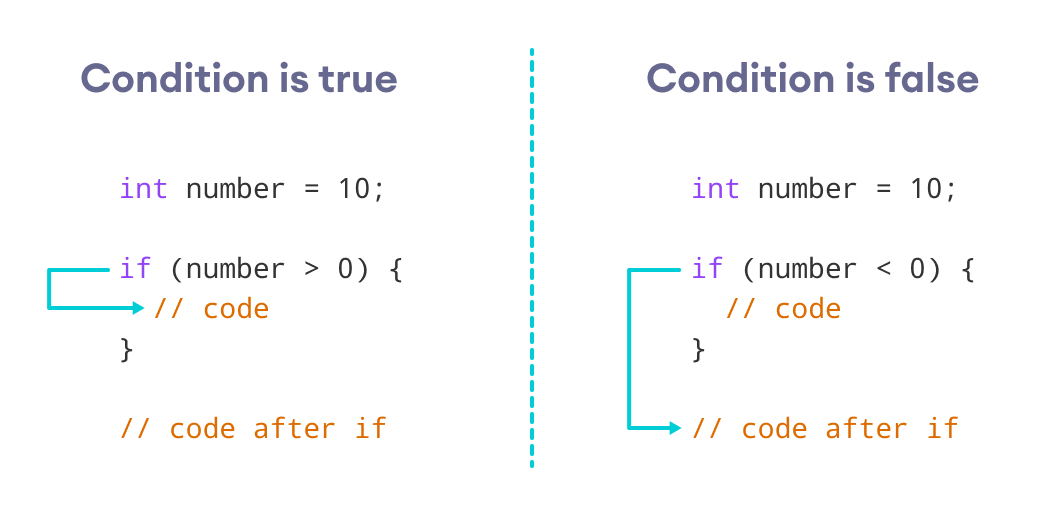
#### Working of if Statement

<figure><img src="https://cdn.programiz.com/sites/tutorial2program/files/java-if-working.png" alt="if the number is greater than 0, code inside if block is executed, otherwise code inside if block is skipped" height="256" width="520"><figcaption><p>Working of Java if statement</p></figcaption></figure>

***

\
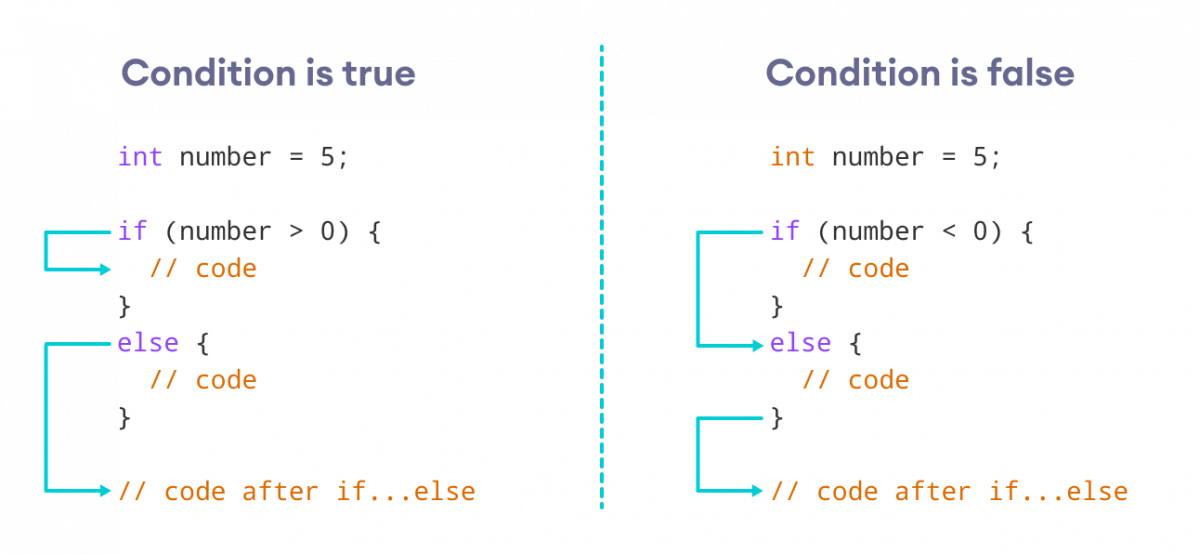
How the if...else statement works?

<figure><img src="https://cdn.programiz.com/sites/tutorial2program/files/java-if-else-working.png" alt="If the condition is true, the code inside the if block is executed, otherwise, code inside the else block is executed" height="267" width="580"><figcaption><p>Working of Java if-else statements</p></figcaption></figure>

***

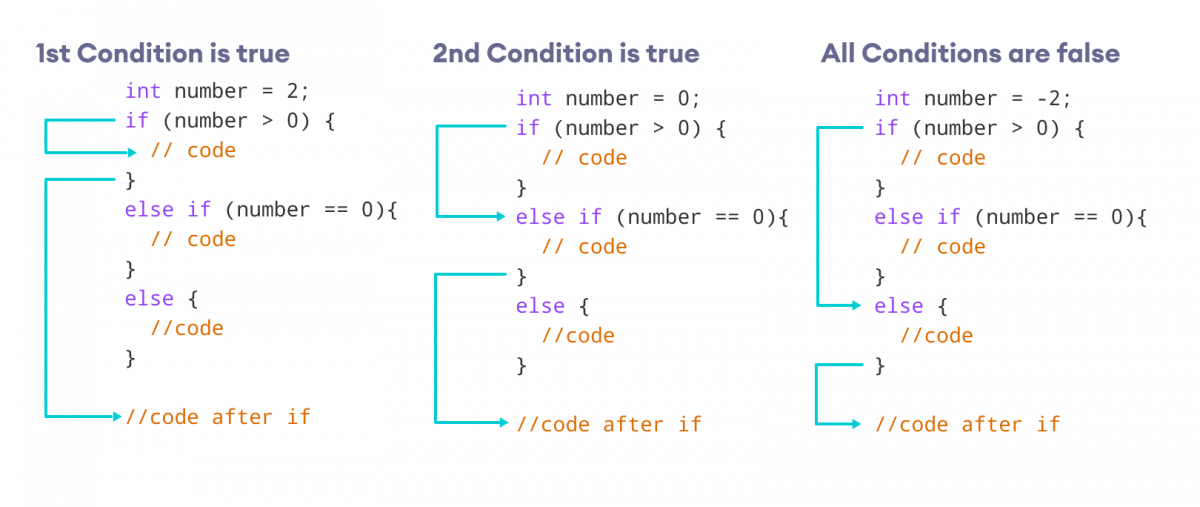
#### How the if...else...if ladder works?

<figure><img src="https://cdn.programiz.com/sites/tutorial2program/files/java-if-else-if-statement.png" alt="If the first test condition if true, code inside first if block is executed, if the second condition is true, block inside second if is executed, and if all conditions are false, the else block is executed" height="312" width="740"><figcaption><p>Working of if...else...if ladder</p></figcaption></figure>

***

```java
class Main {
  public static void main(String[] args) {

    int number = 0;

    // checks if number is greater than 0
    if (number > 0) {
      System.out.println("The number is positive.");
    }

    // checks if number is less than 0
    else if (number < 0) {
      System.out.println("The number is negative.");
    }
    
    // if both condition is false
    else {
      System.out.println("The number is 0.");
    }
  }
}
```

\ <br>

**Output**

```
The number is 0.
```

### Java switch Statement

```java
switch (expression) {

  case value1:
    // code
    break;
  
  case value2:
    // code
    break;
  
  ...
  ...
  
  default:
    // default statements
  }
```

### Java for Loop

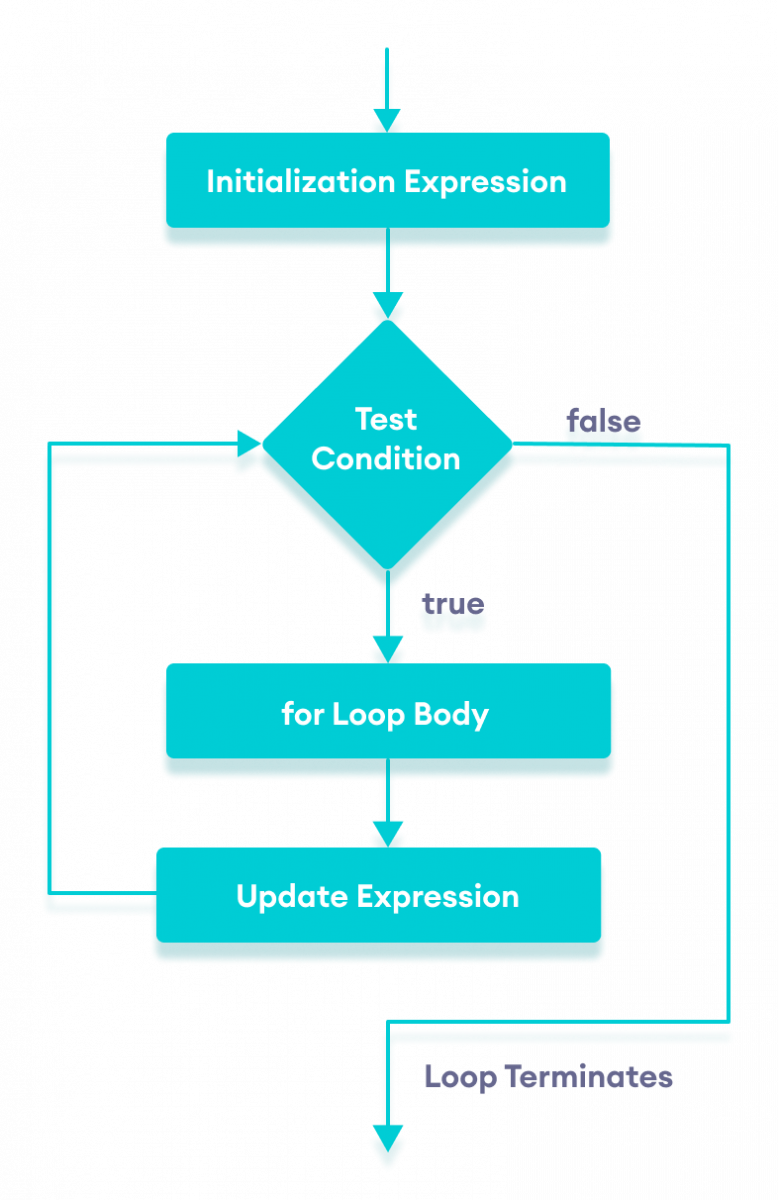
<figure><img src="https://cdn.programiz.com/sites/tutorial2program/files/java-for-loop.png" alt="Working of for loop in Java with flowchart" height="493" width="320"><figcaption><p>Flowchart of Java for loop</p></figcaption></figure>

***

### for-each Loop Sytnax

```java
// print array elements 
class Main {
  public static void main(String[] args) {
    // create an array
    int[] numbers = {3, 9, 5, -5};
    // for each loop 
    for (int number: numbers) {
      System.out.println(number);
    }
  }
}

/* Output
3
9
5
-5
*/
```

### Java while loop

```java
while (testExpression) {
    // body of loop
}
```

<figure><img src="https://cdn.programiz.com/sites/tutorial2program/files/java-while-loop.png" alt="Flowchart of while loop in Java" height="460" width="350"><figcaption><p>Flowchart of Java while loop</p></figcaption></figure>

<figure><img src="https://cdn.programiz.com/sites/tutorial2program/files/java-do-while-loop.png" alt="Flowchart of do...while loop in Java" height="383" width="300"><figcaption><p>Flowchart of Java do while loop</p></figcaption></figure>

***

```java
do {
    // body of loop
} while(textExpression);
```

### Break Statement

### How break statement works?

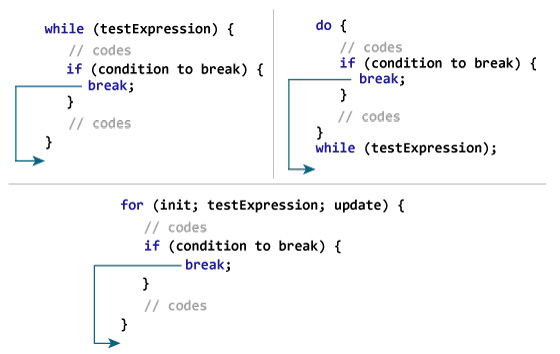
<figure><img src="https://cdn.programiz.com/sites/tutorial2program/files/java-break-statement-works.jpg" alt="How break statement works in Java programming?" height="354" width="560"><figcaption><p>Working of Java break Statement</p></figcaption></figure>

```java
if (number < 0.0) {
    break;
}
```

### Java break and Nested Loop

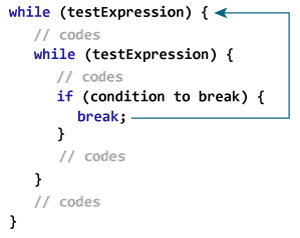
<figure><img src="https://cdn.programiz.com/sites/tutorial2program/files/nested-while-loop-break.jpg" alt="The break statement terminates the innermost while loop in case of nested loops." height="238" width="300"><figcaption><p>Working of break Statement with Nested Loops</p></figcaption></figure>

### Labeled break Statement <a href="#labeled-break" id="labeled-break"></a>

<br>

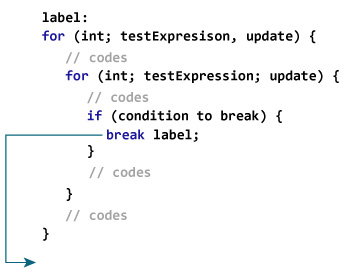
<figure><img src="https://cdn.programiz.com/sites/tutorial2program/files/labeled-break-statement-Java.jpg" alt="The labeled break statement is used to break the outermost loop." height="276" width="350"><figcaption><p>Working of the labeled break statement in Java</p></figcaption></figure>

### Java continue Statement

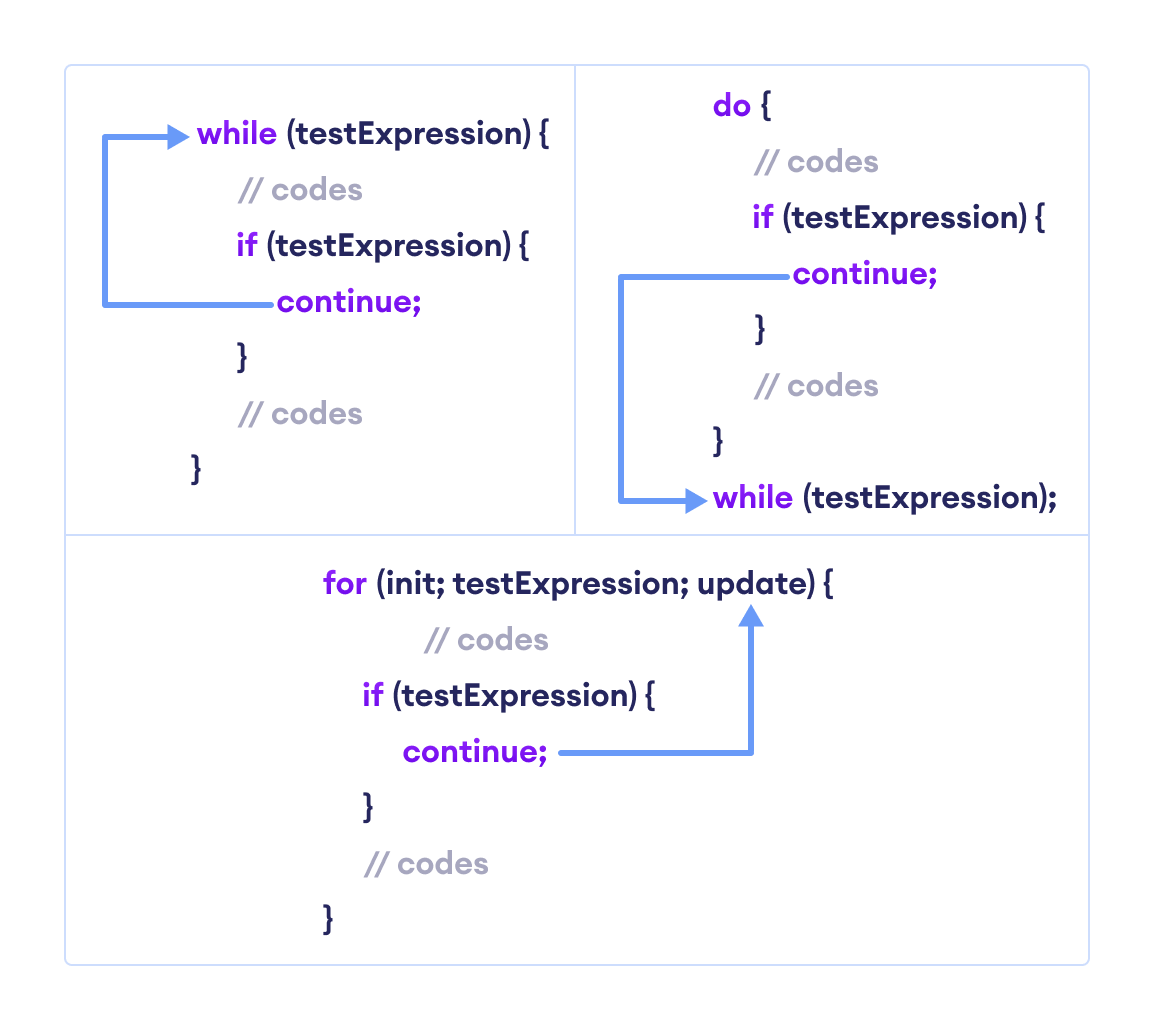
**Working of Java continue statement**

<figure><img src="https://cdn.programiz.com/sites/tutorial2program/files/java-continue.png" alt="The working of continue statement with Java while, do...while, and for loop." height="499" width="560"><figcaption><p>Working of Java continue Statement</p></figcaption></figure>

**Java continue with Nested Loop**.

<figure><img src="/files/g1bz8sV4FYT87FBYIuv2" alt=""><figcaption></figcaption></figure>

***

### Java continue with Nested Loop <a href="#continue-nested-loops" id="continue-nested-loops"></a>

<figure><img src="/files/M4tpEyG4KYk61e2XcJb4" alt=""><figcaption></figcaption></figure>

### Labeled continue Statement <a href="#labeled-continue" id="labeled-continue"></a>

<figure><img src="/files/NIQ7ZLl1EhJpORuXRfpD" alt=""><figcaption></figcaption></figure>

### Java Arrays

```java
String[] array = new String[100];
// declare arrray 
dataType[] arrayName;
```

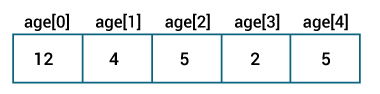
```java
// declare an array
int[] age = new int[5];

// initialize array
age[0] = 12;
age[1] = 4;
age[2] = 5;
..
```

<figure><img src="https://cdn.programiz.com/sites/tutorial2program/files/initialize-array-during-declaration-java.jpg" alt="Elements are stored in the array" height="74" width="300"><figcaption><p>Java Arrays initialization</p></figcaption></figure>

```
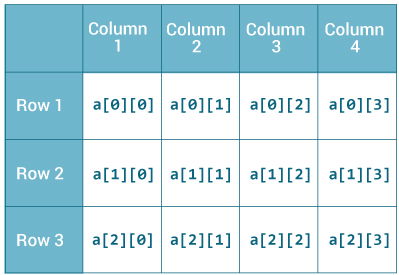
int[][] a = new int[3][4];
```

Here, we have created a multidimensional array named a. It is a 2-dimensional array, that can hold a maximum of 12 elements,

<figure><img src="https://cdn.programiz.com/sites/tutorial2program/files/java-2d-array.jpg" alt="2-dimensional array in Java" height="275" width="399"><figcaption><p>2-dimensional Array</p></figcaption></figure>


---

# Agent Instructions
This documentation is published with GitBook. GitBook is the documentation platform designed so that both humans and AI agents can read, navigate, and reason over technical content effectively. Learn more at gitbook.com.

## Querying This Documentation
If you need additional information that is not directly available in this page, you can query the documentation dynamically by asking a question.

Perform an HTTP GET request on the current page URL with the `ask` query parameter:

```
GET https://sec88.0x88.online/programming/java/java-essentials.md?ask=<question>
```

The question should be specific, self-contained, and written in natural language.
The response will contain a direct answer to the question and relevant excerpts and sources from the documentation.

Use this mechanism when the answer is not explicitly present in the current page, you need clarification or additional context, or you want to retrieve related documentation sections.